The Create Record rule type is a dynamic rule you can use to create records for Salesforce objects that are linked (field type = reference) to th incoming Transaction or Inbound Report record. You can map fields from the inbound record or define static values to fill in fields on the created record.
The name of this rule in the Rule Type selection popup changes depending on the reference field. When you add a Create Record rule to a Campaign reference field, for example, the rule type name is Create Record.
For reference fields to Contact, Installment and Payment Profile, however, the name of the Rule Type changes to Create Contact, Create Installment and Create Payment Profile accordingly. For these Salesforce objects, FinDock automatically maps fields from the incoming record to the given target Salesforce object wherever possible to ensure data is created in a way that FinDock supports. The automatically mapped fields are not editable.
If you are going to use the Create Record rule to create Payment Profile records, you should ensure Enforce uniqueness is enabled (FinDock general settings, enabled by default). You can use a create rule for Payment Profile without enabling enforce uniqueness. However, processing this rule may lead to duplicate records in some cases.
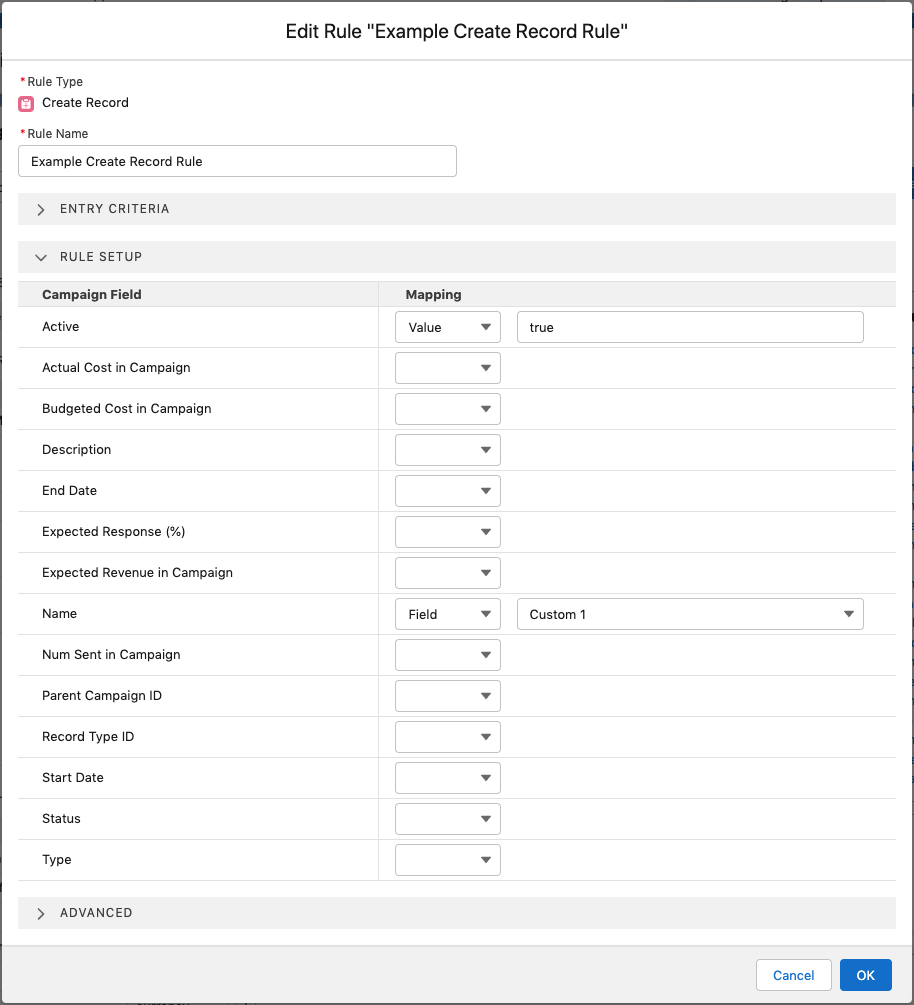
In the following example, the Create Record rule is used to create a Campaign record that is active and takes the Name value from the Custom 1 field of the Transaction record.
| Setting | Description |
|---|---|
| Mapping | Each field of the created object can be mapped. A field can be either mapped to a constant value or to a Transaction field. |
| Upsert Field | Under advanced settings, select this option if you want the rule to use an upsert operation, instead of insert, using the selected field as key. Upserting ensures there is no chance of duplicate records being created. A deduplication approach using a query rule to first find existing records and then only create if not found catches most duplication scenarios. However, this approach cannot 100% guarantee no duplications because of the parallel processing characteristics of Guided Matching. |